Every computer or device on a network has to have an IP address for communication purposes. An IP address is an identifier for your computer or device on a internet or your office network, more like a physical address. Having an IP address allows a device to communicate with other devices over an IP-based network like the internet. There are two ways of assigning this address to the device: Static IP done by you manually and dynamic IP done by the DHCP server.
When a device is assigned a static IP address, the address does not change. Most devices use dynamic IP addresses, which are assigned by the network when they connect and change over time.
Static IP
This is where a user assigns an IP address to a device manually. For each computer on the network, you have to open up the network configuration page and manually type in an IP address, a subnet mask, default gateway, and a DNS server.
To set a static IP address for your computer or device, Click Start Menu > Control Panel > Network and Sharing Center . (For Windows 8 and higher, search for and open Control Panel and select Network And Internet).
Click Change adapter settings .
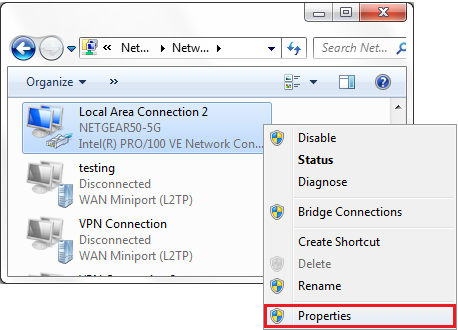
Right-click on Local Area Connection and click on Properties .
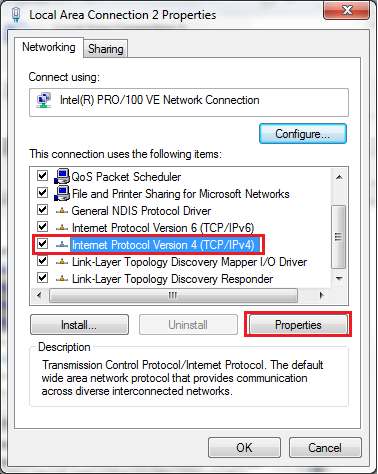
Select Internet Protocol Version 4 (TCP/IPv4) and click on Properties .
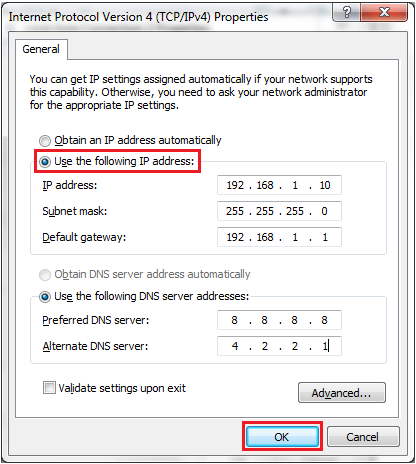
Select Use the following IP address and enter the IP address, Subnet Mask, Default Gateway. and DNS server. Click OK and close the Local Area Connection properties window.
This is a lot of work, especially when dealing with a large network of computers, because you have to do the same thing every time you want to add a computer or device to the network. You also have to ensure that all the IP addresses are unique, so that you don’t cause a conflict by assigning the same address to more than one computer.
Dynamic IP
Here, a computer gets an address automatically from a DHCP server. This server automatically assigns an IP address, a subnet mask, default gateway, and a DNS server to the computer. All you need to do is to open the network configuration window and set the computer to obtain an IP address automatically.
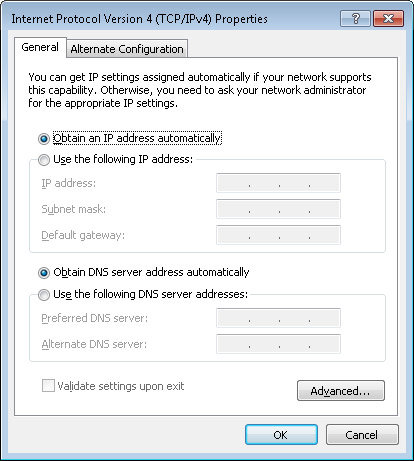
When you choose this option, the computer will broadcast a request for an IP address on the network, then the DHCP server will assign an IP address from its pool, and deliver it to the computer. You can go ahead and verify all the settings that the server has given to your computer.
Open up a command prompt, type ipconfig/all
You should be able to see that DHCP is enabled, and the IP address, subnet mask, default gateway, and DNS server given to your computer.
Related post: How to know your Router’s or MiFi’s IP address
DHCP Scope
A DHCP server assigns IP addresses to computers on a network from its scope. The scope is a range of IP addresses that the server can hand out. For example, a scope ranging from 192.168.1.1 to 192.168.1.100 implies that there are up to 100 addresses that can be assigned by the server.
When computers obtain the IP address from the server, it comes as a lease – the amount of time that the IP address is assigned to a computer. This is to ensure that the DHCP does not run out addresses in its scope, thus the computer does not own the address. If the lease runs out, the computer will send a signal to the DHCP server asking it to renew its lease of the IP address; informing it that it’s still present on the network and the IP address is still in use.
If a computer is removed from the network, it won’t be able to ask for a lease renewal. Thus when a new computer is added to the network, the IP address of the removed computer can be assigned to it.
Address Reservation
If you want a computer or device on the network to have a specific IP address all the time, you can create a reservation on the DHCP server. This ensures that a specific computer or device identified by its MAC address will always be given the same IP address when it requests for an address from the DHCP server. Reservations are given to special devices or computers such as network printers, routers, servers because these should be given the same IP address constantly.
DHCP is a service that runs on servers, such as Microsoft server or a Linux server. It also runs on routers, whether a business or small home/office server.
I’m a tech enthusiast and digital explorer based in Kenya passionate about Android, Linux, and the world of custom ROMs. I love tinkering with devices to craft personalized, optimized experiences. When I’m not deep in code or tweaking gadgets, you’ll find me immersed in science fiction, philosophy, or writing about the ever-evolving tech landscape from an African perspective.
Type your email…
Talkio Mobile , Uganda’s newest telecommunications service provider, is excited to announce a groundbreaking partnership with Banana Life Investments, a leading chain of mobile phone and retail shops. This strategic alliance aims to bring Talkio’s innovative telecom services closer to Ugandans.
This collaboration will leverage Banana Life Investments’ extensive retail network of 26 stores strategically located across Uganda in major malls, towns, and cities to provide customers with unparalleled convenience. Through this partnership, Talkio Mobile will offer its full suite of services, including SIM cards, airtime, and exclusive product offerings at any Banana Life Investment location.
This partnership is more than a business initiative—it’s a shared commitment to transforming lives. By integrating Talkio Mobile’s forward-thinking services & nationwide reach with Banana Life Investments’ retail footprint, the two brands are setting a new standard for customer convenience and inclusivity.
READ ALSO: 5 Things You Need to Know About Talkio Mobile: New Telecom Company in Uganda
“This partnership aligns perfectly with our mission of connecting Ugandans to innovative and transformative telecom solutions,” said Vianne Allan Ahura, CEO of Talkio Mobile. “By leveraging Banana Life Investments’ trusted presence and nationwide footprint, we are not only expanding our agent network but also bringing our services closer to the communities we serve. This collaboration ensures that our online customers can now enjoy a seamless offline experience right at their doorstep. Together, we are empowering Ugandans with the tools they need to stay connected, grow their businesses, and unlock new opportunities.”
Solomon Ssemuyaba, the assistant general manager at Banana Life Investments, echoed this sentiment: “We are proud to join hands with Talkio Mobile to deliver innovative, customer-centric solutions. This partnership represents our shared vision of fostering a connected future for Uganda. Together, we are redefining what convenience and accessibility mean for our customers.”
The partnership goes beyond retail distribution, introducing joint initiatives aimed at value addition and personalized service. Customers can expect seamless access to:
- SIM Card Sales : Available at all Banana Life Investments locations.
- Talkio phone number bookings : Book your preferred Talkio number at any Banana Life Investments location.
- Airtime Services : Recharge easily through in-store purchases.
- Customer Support : Friendly and knowledgeable staff trained to assist with Talkio Mobile products and services.
Additionally, the two companies plan to launch promotional campaigns and expand services to even more locations, ensuring no Ugandan is left behind in the digital transformation.
Solomon Obwot is a tech writer based in Kampala, Uganda, with extensive experience in the local tech startup ecosystem. He covers the latest news and analysis on consumer tech, writes in-depth smartphone reviews, and conducts insightful interviews with industry experts. Solomon is also a passionate podcaster, sharing his knowledge and engaging in discussions about Africa’s rapidly growing tech landscape. Send emails to [email protected]
Type your email…
The Mobile World Congress (MWC) Barcelona , the world’s largest exhibition for the mobile industry, has just concluded. This annual event gathers leading technology brands to unveil groundbreaking mobile, AI, and digital solutions innovations. At MWC 2025, TECNO showcased a range of AI-driven products, reinforcing its commitment to cutting-edge technology.
The key launches included:
- CAMON 40 Series – AI-powered smartphones with One-Tap FlashSnap and advanced mobile imaging features.
- MEGABOOK S14 – The world’s lightest 14-inch OLED laptop, featuring AI-enhanced multitasking and Snapdragon® X Elite.
- MEGABOOK T14 Air & K15S – Lightweight ultrabooks with AI capabilities and extended battery life.
- TECNO AI Glasses Series – Smart eyewear integrating AI imaging, translation, and AR display.
Jan Stryjak, Associate Director at Counterpoint Research, shared, “In the past year, we have observed significant advancements in the field of AI. AI will continue to drive transformative changes in our daily lives. In this critical period for the economic development of emerging markets, TECNO’s AI technologies are unlocking potential for diverse needs.”
“The application of AI technologies is crucial and urgent in emerging markets. We’re committed to bridging the digital gap between emerging and mature markets,” said TECNO CMO, Laury Bai. “TECNO is taking a practical approach to make AI more accessible, ensuring users in emerging markets can access AI and cutting-edge technologies.”
Laury Bai, TECNO CMO
Driven by its commitment, TECNO has forged a robust partnership with MediaTek, establishing a joint AI laboratory dedicated to accelerating advancements in AI. At the event, James Chen, Vice President of Product and Technology Marketing at MediaTek, emphasized, “The synergistic R&D efforts between TECNO and MediaTek are set to democratize AI technology. Our collaboration powers a seamless, interconnected AI experience, bringing users a future of truly connected intelligence.”
James Chen, Vice President, Product and Technology Marketing at MediaTek
CAMON 40 Series Powered by AI One-Tap FlashSnap Revolutionizes Smartphone Snapshot Photography
TECNO’s Global Product Launch Officer, Olivier Mas, officially unveiled TECNO’s next-generation AI-driven products. Attendees at TECNO’s launch event witnessed the highly anticipated debut of TECNO’s new CAMON 40 Series, a device that embodies TECNO’s legacy of excellence in mobile imaging. Featuring One-Tap FlashSnap Mode and TECNO AI, the series sets a new benchmark in smartphone photography, delivering exceptional snapshot capabilities and AI-enhanced user experiences.
Olivier Mas, TECNO Global Product Launch Officer
The CAMON 40 Series exemplifies a commitment to innovation that transcends hardware and software, extending into strategic partnerships that deliver cutting-edge AI solutions to emerging markets. Matt Waldbusser, Managing Director of Global Solutions and Consumer AI at Google Cloud, remarked, “Our collaboration with TECNO on the CAMON 40 Series is a standout example. Leveraging Google Cloud’s capabilities, we’ve introduced groundbreaking features such as Ask Ella, AI Image Generator, AI Writing, and AI Translate. I am particularly impressed by the industry-leading and competitive edge of some of these innovations. For instance, TECNO’s AI supports text translation in 136 languages, voice translation in 44 languages, and photo translation in 51 languages. We are excited to further strengthen our partnership with TECNO, unlocking limitless potential to bring advanced yet practical AI capabilities to emerging markets in a convenient and secure manner.”
Matt Waldbusser, Managing Director of Global Solutions and Consumer AI at Google Cloud
The CAMON 40 Series’ innovative One-Tap FlashSnap leverages AI to enhance imaging capabilities, revolutionizing mobile photography. AI optimizes camera startup and continuous shooting for instant captures, while AI-powered multi-frame processing intelligently reduces noise and enhances details, delivering sharper, more refined images. Additionally, the BestMoment algorithm analyzes motion patterns, automatically selecting the optimal frames for precise, high-quality shots in dynamic scenarios, ensuring users an unparalleled mobile imaging experience.
TECNO CAMON 40 Demonstrates the Cutting-Edge FlashSnap Capability
To delve deeper into the imaging prowess of the CAMON 40 Series, TECNO invited Frédéric Guichard, CEO of DXOMARK, to share the image performance of CAMON 40 Pro. Frédéric highlighted, “The CAMON 40 Pro 5G has demonstrated exceptional imaging and performance capabilities in our rigorous evaluations. We’ve been particularly impressed with photo performance being the best for devices under 600$, and the 1st eligible device to our Smart Choice Label.”
Onsite photo of Frédéric Guichard, CEO of DXOMARK
Beyond its advanced rapid-capture functionality, the integration of TECNO AI further enhances the device’s capabilities. Intelligent imaging, a 360° AI Call Assistant, and productivity tools elevate creativity and efficiency. Powered by MediaTek’s latest chipsets, the series ensures smooth performance, fast processing, and extended battery life. With a sleek, durable, and water-resistant design, it seamlessly blends style with practicality for modern users.
MEGABOOK S14, the World’s Lightest 14-inch OLED Laptop, Inspires Creators and Game Lovers
The MEGABOOK S14 is TECNO’s first OLED laptop and the industry’s lightest 14-inch OLED laptop, featuring a 2.8K OLED display and incredibly weighing only 899g (31.7oz). The laptop is equipped with the outstanding power of the Snapdragon® X Elite compute platform, the flagship chipset for AI PCs from Qualcomm Technologies, and integrates TECNO’s world’s first self-developed edge-side large-scale AI model, to achieve AI-enhanced multitasking.
World’s Lightest 14-inch Laptop MEGABOOK S14
Specifically designed for next-gen AI productivity, TECNO AI enhances the Ella AI Assistant, AI-powered PPT generation, AI-driven image search, smart albums, and offline meeting transcription with multilingual support. The External Graphics Dock, equipped with a powerful NVIDIA graphic card, delivers scalable, high-performance capabilities for design, gaming, and content creation. The laptop’s 2.8K OLED display with a 120Hz refresh rate ensures exceptional visuals, while DTS:X Ultra dual 2W speakers, Wi-Fi 6E, fingerprint login, and PC Manager optimize connectivity and user experience.
TECNO’s strategic partnership with Qualcomm Technologies was a highlight of the TECNO AI Ecosystem Product Launch event, demonstrating a shared vision for the future of AI PCs. Kedar Kondap, SVP & GM of Compute and Gaming at Qualcomm, took the stage to discuss the integration of Qualcomm’s cutting-edge PC chipset into the new MEGABOOK S14 laptop, underscoring TECNO’s commitment to delivering high-performance computing solutions.
Kedar Kondap, SVP & GM of Compute and Gaming at Qualcomm
In addition, TECNO also introduced several standout new products. The featherlight 999g (35.2oz) ultrabook MEGABOOK T14 Air, features high-speed storage and LPDDR5 memory, while the ultra-thin, all-metal MEGABOOK K15S, equipped with a powerful 70Wh battery and supported by a 65W PD GaN charger, offers a smarter and more long-lasting user experience. Both devices are empowered by TECNO AI with advanced AI capabilities such as AI Album and AI Voice Assistant, making them perfect companions for all aspects of life.
The Next Game-Changing Tech Innovation: See the World with the TECNO AI Glasses Series
TECNO’s new AI Glasses Series also took center stage with the introduction of TECNO AI Glasses Pro and TECNO AI Glasses, reimagining eyewear with cutting-edge imaging, intelligent interactions, and a sleek aesthetic. The TECNO AI Glasses feature an aviator design, while the Pro model showcases a browline style, both embodying timeless elegance and modern fashion.
TECNO AI Glasses Redefine the Way People See the Future
Equipped with a 50MP high-definition camera, the series integrates an OV50D sensor, a 100° ultra-wide-angle custom lens, and an AI ISP imaging chip, forming a mobile-grade imaging system. This system lets users capture stunning, high-resolution photos with advanced AI noise reduction and HDR capabilities. With real-time translation supporting over 100 languages, TECNO AI’s Ella empowers accurate translation even for less common languages, as well as voice control, AI-powered object recognition, and intelligent information summaries for ultimate convenience.
Additionally, the AI Glasses Pro features a MicroLED display with 7th-gen resin waveguide technology, offering a 30° field of view, over 1,500 nits of brightness AR display, and a lightweight, ultra-thin design. The AR display allows users to effortlessly enjoy features like translation display, navigation, information prompts, and teleprompting.
Equipped with a 250mAh battery, these glasses offer over 11 hours of music playback and 8 hours of mixed use with just 30 minutes of charging. An advanced ultra-linear speaker, bass enhancement, and spatial sound deliver an immersive audio experience, while Wi-Fi 6 and Bluetooth 5.4 ensure seamless connectivity.
With these innovative launches, TECNO is setting new standards in mobile imaging and AI-enhanced technology, shaping a more connected and empowered future for consumers in emerging markets. Once again, TECNO has showcased its cutting-edge innovation on the global stage at MWC. With the brand essence of “Stop at Nothing”, TECNO’s relentless pursuit of innovation is making AI-powered technology more accessible, allowing consumers to experience the future ahead of time.
Solomon Obwot is a tech writer based in Kampala, Uganda, with extensive experience in the local tech startup ecosystem. He covers the latest news and analysis on consumer tech, writes in-depth smartphone reviews, and conducts insightful interviews with industry experts. Solomon is also a passionate podcaster, sharing his knowledge and engaging in discussions about Africa’s rapidly growing tech landscape. Send emails to [email protected]
Type your email…
