Truly, security is one aspect of smartphones that have undergone massive developments over the years. Fingerprint sensors arguably marked the beginning of biometric authentication on smartphones but iris scanners, voice authentication and facial unlock have also keenly followed suit. Popularized by Apple in the form of Face ID on the iPhone X two years ago, facial unlock was the last form of advanced biometric. Now, at the recently concluded Mobile World Congress (MWC) 2019 event in Spain, LG Technology unveiled a new flagship device with an advanced form of biometric authentication called ‘Palm Unlock’ .
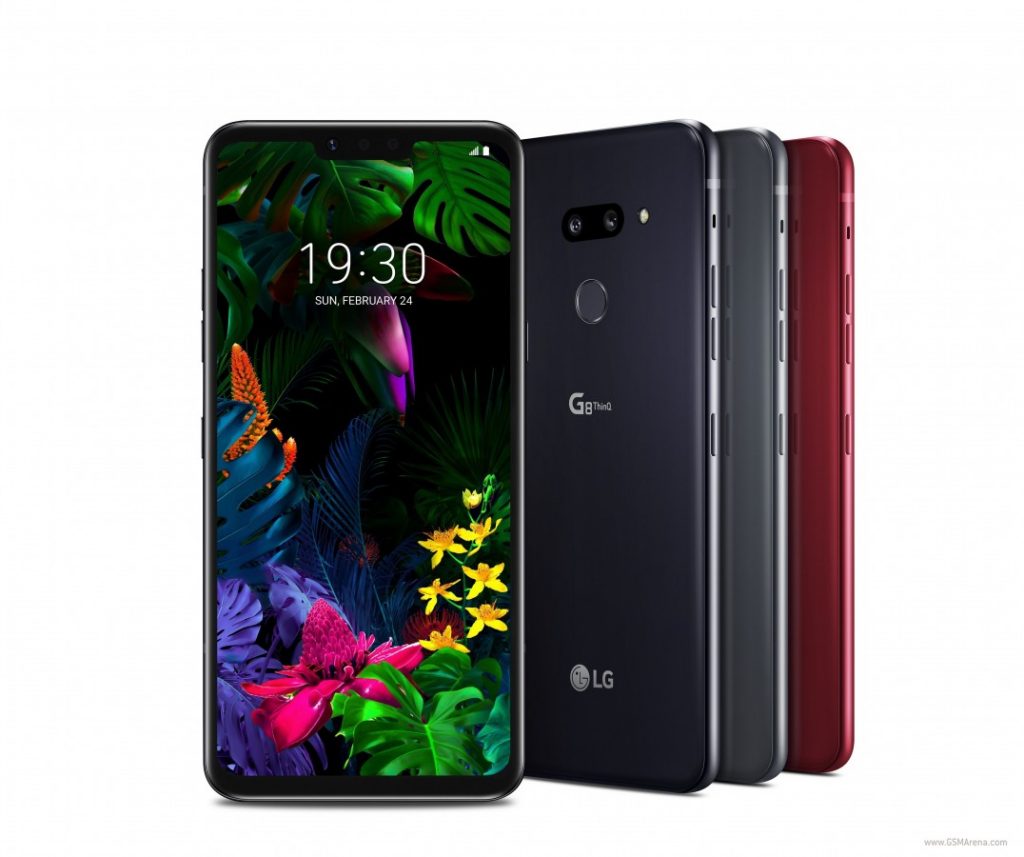
LG G8 ThinQ
From the name of the features, it’s obvious that the technology will allow users unlock their devices with their palms and the LG G8 ThinQ is the first device in the world to sport such feature.
Palm Unlock Authentication: What exactly is this?
You know how fingerprint sensors authenticates using the unique prints on your finger(s), LG’s Palm Unlock/ Palm ID/ Hand ID (it has a lot of names, really) basically reads the shape, thickness as well as other characteristics about the veins in your palm to unlock your device. Apparently, this method of authentication is effective and secure because the veins in our palms are wired differently. Interestingly, LG maintains the its Palm Unlock authentication is way more secure than fingerprint sensors.
How does it work?
Although Palm Unlock is sort of an advanced form fingerprint authentication, the unlock pattern is similar to how Face Unlock works. For Palm Unlock, there is no ‘Palm sensor’ but instead, a dedicated Time of Flight (FoT) 3D camera and infrared sensors located beside the LG G8 ThinQ’s selfie camera reads the necessary vein information on your palm to unlock your device.
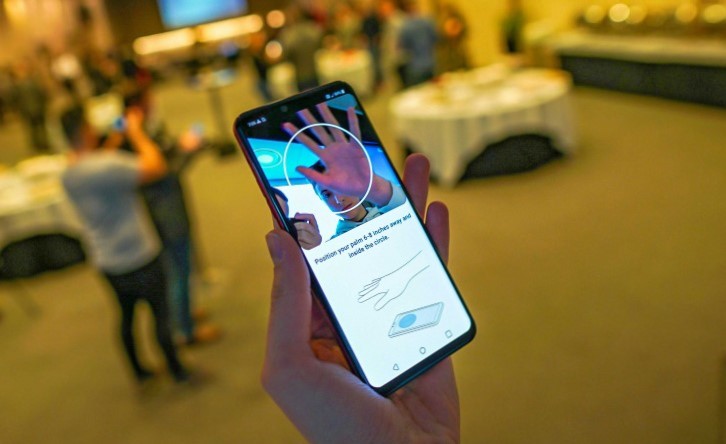
Image source:GSMArena
All that is required of the user is to place the registered hand right in front of the camera (about 6-8 inches away) to unlock the device. Doing this prompts t he infrared sensors to emit an IR signal to your palm, extracting a map of your veins based on how the hemoglobin in your blood (a red protein responsible for transporting oxygen in the blood) absorbs the infrared signal . According to LG, the extracted vein map are extremely difficult to beat from a security standpoint.
Other Uses
Just as you can use other forms of biometric authentication to do other activities ( lock apps , authorize payment etc.) asides unlocking your device, Palm Unlock is also equipped to do a whole lot of interesting stuff apart from unlocking your device. Depending on how you customize the feature on the device, the LG G8 ThinQ’s ToF 3D camera allows for ‘Air Motion’ gestures.
With Air Motion, you can use your phone without having to touch, hold or lift it up from a surface. Gestures such as waving your hand and pinching the air can be used to increase or decrease your phone’s volume, place a call, change music, taking screenshots, switch between applications etc. If you use your phone a lot while driving or wearing gloves, you might find the palm gestures interesting but…
What are the prospects?
The palm-reading feature of the LG G8 ThinQ is something to get excited about. At the same time, it’s not. Because think about it: does it really hold any prospect? Do you see yourself holding your phone in one hand while waving your second hand at the camera to have it unlocked? For what it’s worth, I think I speak for all smartphone users when I say we all want to operate our smartphone’s the entire day using only just one hand. Imagine carrying a bag of groceries on one hand and your phone on the second, do you want to drop the bag just to unlock your phone using your palm? Or you’d just use fingerprint or Face unlock instead.
To add to that, the Palm unlock technology might be more secure than fingerprint and Face ID — at least according to the manufacturer– but it’s definitely not as fast. In this era of hasty living, consumers cherish speed just as much as security — if not more.
I’ve not had hands-on experience with the a Palm-reading device yet but TheVerge has, and they just as much think Palm Unlock is not sufficient enough to displace fingerprint sensors or face unlock. Reviewing the device at the MWC 2019, Chaim Gartenberg from TheVerge said;
It sounds cool in theory, but in my brief time trying out the G8, neither the palm unlock nor the gestures worked great. It took a lot of hand waving just to get the phone to recognize my palm just to unlock it, and the gestures — which require a complex sequence of placing your hand closer to the phone, drawing it a few inches back, and then making the gesture — were even tougher to do. Part of that may just be my own unfamiliarity with the system, considering that it’s just not a familiar way to use a phone, but after a few minutes with it, I’m not convinced that it’s the kind of marquee feature worth upgrading for.
Again, it’s an interesting feature, really… but it’s not worth upgrading for. And it also begs so many questions: Like Face ID, will Palm Unlock (or Palm ID) live up to its expectations? Will it be the new rave of biometric unlock on smartphones? Is this the next big feature that we should expect to see on upcoming smartphone flagships? Is it even (truly) more secure than fingerprint sensor? Does the future slope towards unlocking and operating smartphones with our palms?
The LG G8 ThinQ is, however, laced with other forms of biometric authentication like a rear-facing fingerprint sensor and an advanced Face Unlock which beats Apple’s Face ID in that its effectiveness cannot be affected by light from external sources and also cannot be fooled with a two-dimensional photograph .
Conclusively though, LG is doing an impressive job. By embedding multiple forms of biometric authentication on the LG G8 ThinQ, the OEM is giving users more smartphone security options to choose from with subject to preference and convenience.
Sodiq Olamide is a tech writer based in Nigeria, covering the latest reviews, how-tos, and news on consumer tech trends with a unique African perspective. Whether analyzing emerging technologies or offering practical guides, Sodiq brings a deep understanding of how technology shapes lives across the continent.
Type your email…
Talkio Mobile , Uganda’s newest telecommunications service provider, is excited to announce a groundbreaking partnership with Banana Life Investments, a leading chain of mobile phone and retail shops. This strategic alliance aims to bring Talkio’s innovative telecom services closer to Ugandans.
This collaboration will leverage Banana Life Investments’ extensive retail network of 26 stores strategically located across Uganda in major malls, towns, and cities to provide customers with unparalleled convenience. Through this partnership, Talkio Mobile will offer its full suite of services, including SIM cards, airtime, and exclusive product offerings at any Banana Life Investment location.
This partnership is more than a business initiative—it’s a shared commitment to transforming lives. By integrating Talkio Mobile’s forward-thinking services & nationwide reach with Banana Life Investments’ retail footprint, the two brands are setting a new standard for customer convenience and inclusivity.
READ ALSO: 5 Things You Need to Know About Talkio Mobile: New Telecom Company in Uganda
“This partnership aligns perfectly with our mission of connecting Ugandans to innovative and transformative telecom solutions,” said Vianne Allan Ahura, CEO of Talkio Mobile. “By leveraging Banana Life Investments’ trusted presence and nationwide footprint, we are not only expanding our agent network but also bringing our services closer to the communities we serve. This collaboration ensures that our online customers can now enjoy a seamless offline experience right at their doorstep. Together, we are empowering Ugandans with the tools they need to stay connected, grow their businesses, and unlock new opportunities.”
Solomon Ssemuyaba, the assistant general manager at Banana Life Investments, echoed this sentiment: “We are proud to join hands with Talkio Mobile to deliver innovative, customer-centric solutions. This partnership represents our shared vision of fostering a connected future for Uganda. Together, we are redefining what convenience and accessibility mean for our customers.”
The partnership goes beyond retail distribution, introducing joint initiatives aimed at value addition and personalized service. Customers can expect seamless access to:
- SIM Card Sales : Available at all Banana Life Investments locations.
- Talkio phone number bookings : Book your preferred Talkio number at any Banana Life Investments location.
- Airtime Services : Recharge easily through in-store purchases.
- Customer Support : Friendly and knowledgeable staff trained to assist with Talkio Mobile products and services.
Additionally, the two companies plan to launch promotional campaigns and expand services to even more locations, ensuring no Ugandan is left behind in the digital transformation.
Solomon Obwot is a tech writer based in Kampala, Uganda, with extensive experience in the local tech startup ecosystem. He covers the latest news and analysis on consumer tech, writes in-depth smartphone reviews, and conducts insightful interviews with industry experts. Solomon is also a passionate podcaster, sharing his knowledge and engaging in discussions about Africa’s rapidly growing tech landscape. Send emails to [email protected]
Type your email…
Smartphones have, over the years, become a very important aspect of our lives. Its use has transgressed from basic communication (calling, texting, etc.) to our everyday work and personal lives. Nowadays, the average smartphone user stores personal files, multimedia, and other documents — banking details, social media, internet banking applications, shopping, work and personal emails etc. — on his device that could cost a fortune if in the wrong hands. This is where smartphone security comes in.
For years, numerical passcodes and alphanumeric passwords were how we kept trying eyes away from the contents of our devices. Now, smartphone manufacturers have stepped things up a notch by complementing the regular form of smartphone security with biometric authentication. And quite impressive enough, smartphones now sport biometric authentication tools that are were only possible on high-end computers.
We highlight all the biometric authentication technology that have been successfully implemented on mobile phones over the years, their advantages, downsides, prospects they hold, and smartphones that support each authentication methods.
Fingerprint
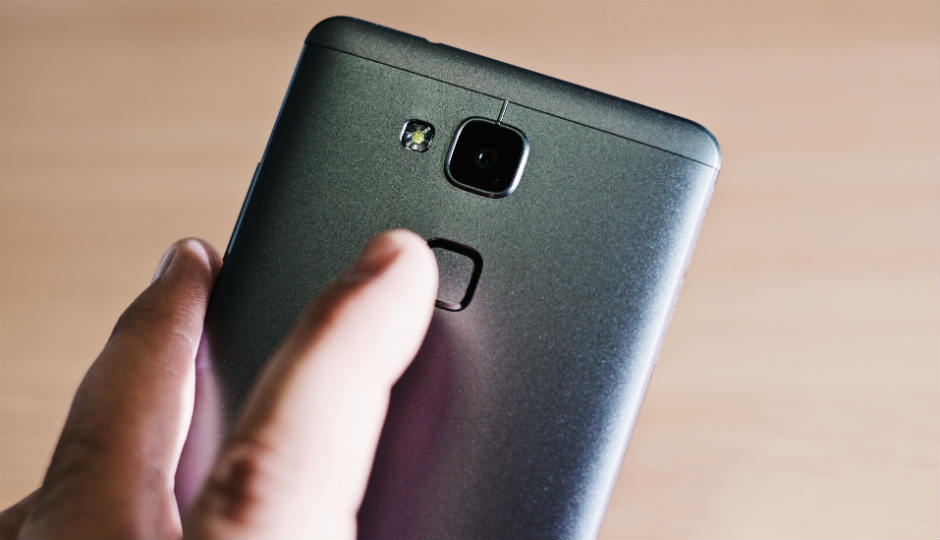
The fingerprint sensor or reader is one of the earliest biometric authentication technology to feature on a smartphone. The history of fingerprint authentication on smartphones dates back to 2004 when a South Korean company announced the Pantech GI100. The device was the first ever device to have a fingerprint scanner for authentication and speed dialing purposes. However, some sources opine that Apple started the modern-day fingerprint scanner revolution when it launched the TouchID with the iPhone 5s.
Pantech GI100
There are basically three types of fingerprint scanners used on smartphones and they differ in how they function and scan prints.
Optical scanners / sensors
Capacitive sensors
Unlike optical sensors that takes an image of your finger, capacitive sensors make use of capacitor circuits (its core component) to collect fingerprint data. This type of sensor is most used fingerprint sensor.
Ultrasonic sensors
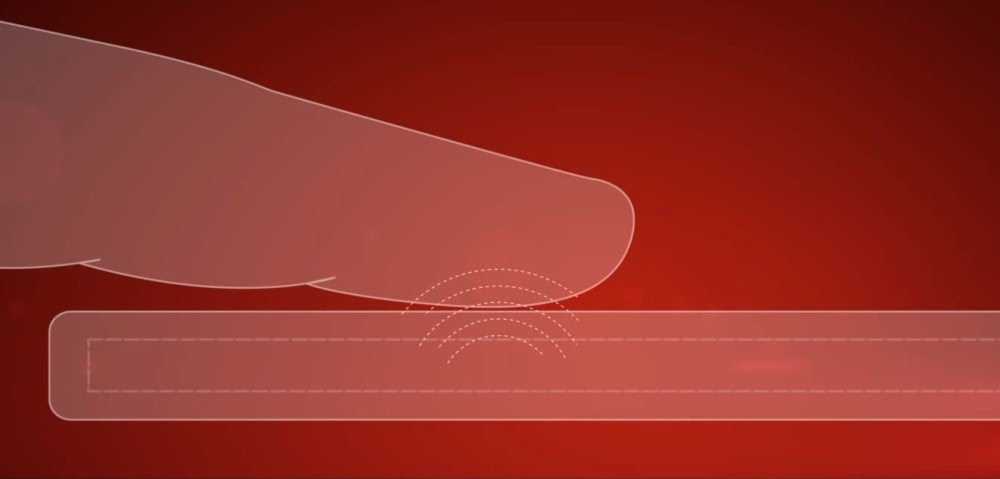
This is a new sensor that was introduced by Qualcomm in 2016 on the LeeCo Le Max Pro. This sensor uses a transmitter to send ultrasonic pulse against your finger to create 3D details of your prints. Only ultrasonic sensors reproduce and store prints in 3D, making the ultrasonic system more secure than 2D versions created by optical and capacitive sensors.
Pros of Fingerprint scanning
Fast unlock time
Can be used for other purposes (like payment authentication) aside device unlock
Cons of Fingerprint scanning
Smartphone can be unlocked without user’s consent i.e when sleeping
Iris Scanner
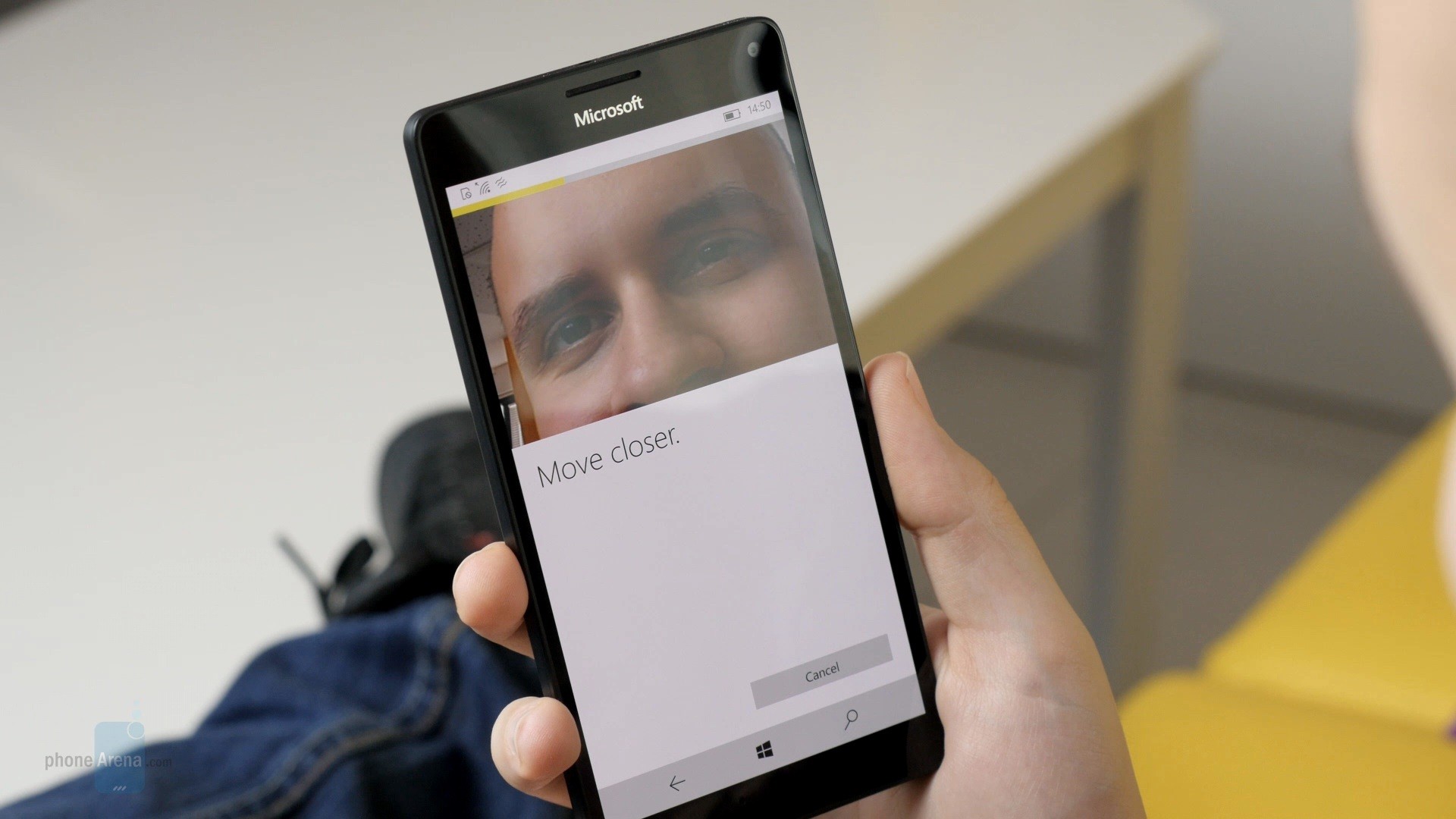
Iris scanning isn’t a very much popular biometric authentication method on a smartphone, it is also more sophisticated way of securing your smartphone. And though Iris scanning is commonly and mostly used on Samsung Galaxy flagships, the technology was first used on a phone — Fujitsu ARROWS NX F-04G — by Japanese company Fujitsu.
How does Iris Scanning work?
The structure of the human eye.
The Iris is a thin and circular structure in the eye. It adjusts the size of the pupil and also responsible for controlling the amount of light that enters the eye. Interestingly, just like fingerprints, no two humans in the world have exactly the same Iris.
The odds of any two irises being identical has been calculated to be one in 10 raised to the power of 78. Barring injury, the patterns remain stable through life, unlike faces, voices and even fingerprints.
The Iris scanner of your smartphone flashes near-infrared (NIR) light into one or both of your eyes to recognise your iris(es) and unlocks your device. The NIR light emitted by the iris sensor is safe and poses no risk to the user.
“The amount of infrared light is no more than would be received by walking outside on a sunny day.”
Pros of Iris Scanning
- Iris Scanning is more accurate — unlike fingerprint (40), the human Iris has 225 different points of comparison.
- Secures your device while you’re asleep.
Cons of Iris Scanning
- Iris scanners are expensive. Thus making phones with iris scanning capabilities generally pricier.
- Iris scanners can be fooled by a high quality (face or iris) image.
- Iris capture can be delayed if a user isn’t looking properly into the camera or if head isn’t still.
- Scanning under direct sunlight can be a problem since the iris may be obscured by bright reflections.
Some smartphones with Iris Scanning method of biometric authentication include Samsung Galaxy S9 Plus , Samsung Galaxy Note 9, LG G6, HTC U11 etc
Voice Recognition
Also known as Voice ID, Speaker recognition, or Voice Biometrics, Voice recognition is an authentication method that grants access to a device by identifying a user’s unique voice pattern.
How Voice Recognition works (www.howitwork.in)
When identifying and differentiating between voices, a device’s voice recognition software takes the following unique voice biometrics into consideration: sound, rhythm, pattern, dialect, speaking style, pitch, format frequencies and spectral magnitudes.
Pros and Cons of Iris Scanning
Voice recognition is also quicker, easier, and relatively more secure. However, there are reports and fears that a good mimic can bypass voice recognition authentication .
Facial Recognition
Facial recognition on Uhans i8 smartphone
Although Facial Recognition only recently became popular when Apple introduced to the iPhone X as Face ID, the isn’t the first instance the technology would be used on a smartphone. Facial Recognition as a form of smartphone security dates back to 2005 when ORMON Corporation, a global leader in automation, control technology, and sensing announced the OKAO Vision Face Recognition Sensor (which could be used on mobile phones, PDAs, and a y camera-enabled device) in Japan.
How does Facial Recognition works?
Depending on some factors like the manufacturer of your smartphone, facial recognition are of different types, have varying characteristics as well as patterns of functioning. Majorly, many smartphones that comes with the feature usually use the front-facing camera and dedicated software to record an image and properties of your face.
Each time you unlock your smartphone, it uses the front camera for recognition, comparing the original scan to what the camera sees. Advertisement - Continue reading below
Presently, there are many smartphones that comes with Facial recognition capabilities but Apple’s Face ID (on the iPhone X and subsequent iPhones), despite its shortcomings , is one of the most sophisticated.
Face ID on iPhone X
Face ID uses an IR beam projector and Infrared camera to create a 3D model of your face; it measures distance traveled by each beam before they hit your face. It is also the most effective, precise, accurate and safest facial recognition system ever used on a smartphone. Unlike most other facial recognition systems, Face ID takes extrinsic properties of the face like facial hairs, accessories into account. Its effectiveness isn’t hindered by growth or accessories as Face ID software automatically and occasionally recaptures and updates your facial template.
Pros
- Convenience — Facial Recognition might not be the safest method of biometric security, but you don’t have to tap buttons, keys, or touch any part of your smartphone before it unlocks.
- Fast and easy to set up
- Effectiveness not hindered by facial growth and accessories
Cons
- Intruders can gain access to your device if you’re asleep by simply placing your phone to your face.
Generally and conclusively, biometric authentication can not entirely replace PIN, passwords, patterns, code etc in terms of security and reliability, they can only supplement. Some of these biometric security systems are still in their early stages and undergoing research and development. Fingerprint sensors, for example, are now being placed under displays. Facial recognition are also becoming faster. It is becoming pretty much obvious that biometric means of authentication is the future of smartphone security.
Sodiq Olamide is a tech writer based in Nigeria, covering the latest reviews, how-tos, and news on consumer tech trends with a unique African perspective. Whether analyzing emerging technologies or offering practical guides, Sodiq brings a deep understanding of how technology shapes lives across the continent.
Type your email…
Authentication is one aspect of devices in the smartphone ecosystem that has undergone series of evolution within a short period of time. Formerly, when smartphone authentication was mentioned, (alphanumeric) passwords, PINs, and Patterns were the dominant trio. Now, biometric authentication is the in-vogue method of smartphone security, of which fingerprint sensors is a very important member.
Nowadays, you barely see a smartphone without a fingerprint sensor. And while all fingerprint sensors have the same end result (unlocking a device by authenticating prints on the fingers), they come in different forms (physical and under-display ) and also have different placements (front-facing, rear-facing, and side-mounted).
Front vs rear vs side fingerprint sensor
Although it’s something of little relevance to some smartphone users & buyers, some individuals are meticulous about details like the fingerprint sensor placement on their device(s). What’s the best position, however, to have your phone’s fingerprint scanner — front, rear, or side?
Front-facing fingerprint scanner
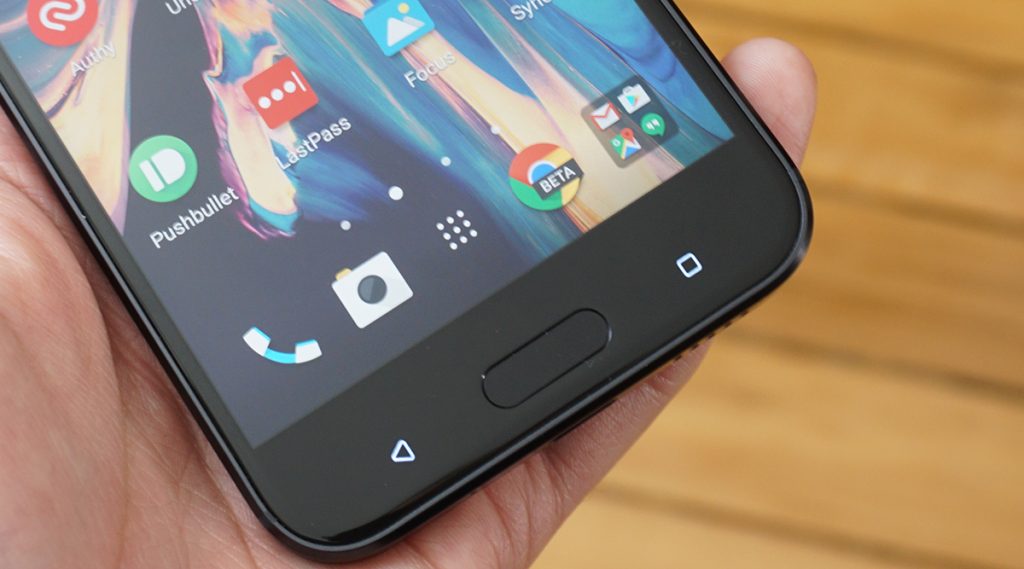
Although fingerprint scanner idea wasn’t first implemented on an iPhone, the Cupertino-based giant arguably helped put fingerprint sensors on the map with the Touch ID on the iPhone 5S in 2013. Samsung played an important role too when it began incorporating fingerprint sensors in its device’s home button since the Galaxy S5.
Fingerprint sensors are now being placed under smartphones displays nowadays but technically, they are also front-facing fingerprint readers. So, is having your smartphone’s fingerprint on the front of the best? Let’s find out.
Pros of Front-facing fingerprint reader
- Ease of use on a surface
One of the major advantages of front-facing fingerprint sensor is the ease of use when you have your phone placed on a surface. Ideally, many users place their phones on their back because they do not want to scratch or damage the screen. At work, at home or anywhere at all, if your phone is on the table, just place your finger on the sensor (or on the screen) and voila!
- Driving? No problem.
If you drive a lot, you might want to consider a phone with front-facing fingerprint scanner. If you place your phone on a phone holder, the fingerprint sensor becomes inaccessible because it’d have been covered up by the holder. In addition, there’s a chance that the holder damages the sensor.
- Convenience & Accuracy
Compared to rear-facing fingerprint readers where you have to, sometimes, locate its position, front-facing fingerprint sensors are easy to locate. Also, using and locating a rear-facing fingerprint sensor can sometimes have you touching your phone’s rear camera(s), smearing and scratching the lens in the process.
Cons of Front-facing fingerprint reader
- Unless it’s embedded under the display, a front-facing fingerprint sensor increases the amount of bezels around the display. And since we are in fully in a “Full-View / Bezel-less” era, front-facing fingerprint sensors are counterproductive and counter-revolutionary.
Rear-facing fingerprint scanner
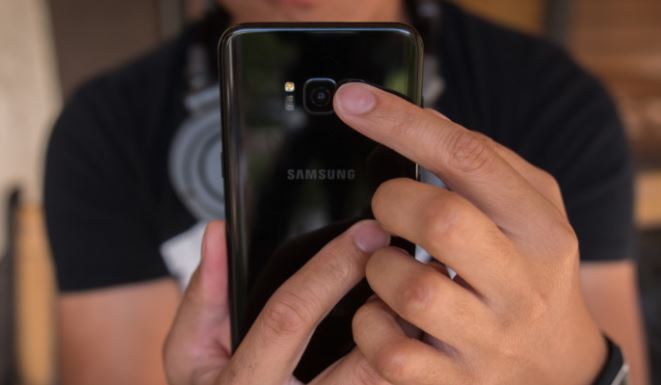
For some reasons, fingerprint sensors are commonly placed on the rear nowadays. Here’s why, as well as the upsides:
Pros of Rear-facing fingerprint sensors
- Bigger screen-to-body ratio
This is clear-cut. If you are the type that cherishes your smartphone’s frontal being (almost) entirely covered by a screen, a rear-facing fingerprint sensor makes that possible.
- Reach and Convenience
When a smartphone’s fingerprint sensor is placed on the rear, you generally have more finger choices to unlock your smartphone with — because most of your fingers naturally rest on the back while using your phone, plus some users argue that it is easier to reach when they take their phones out of their pockets.
Cons of Rear-facing fingerprint sensors
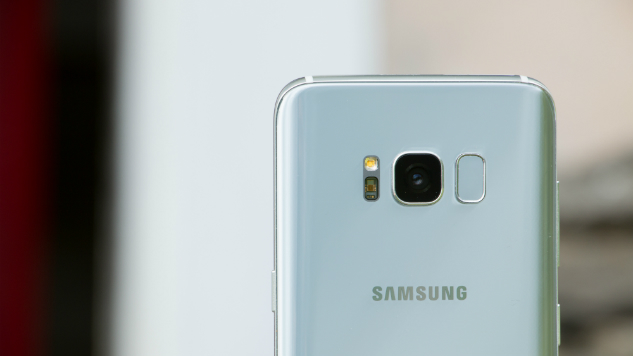
- Sometimes, OEMs embed a device’s fingerprint sensor too close to the primary camera on the rear. The placement might be beautiful and earn the device some aesthetic score but users will, more often than not, touch/scratch/smear the lens of the camera whenever they use the fingerprint sensor. The Samsung Galaxy S8 is a perfect example of a smartphone with the fingerprint too close to the rear camera.
- If you use a phone mount in your car, you might have troubles using your device’s fingerprint sensor while driving.
Side-mounted fingerprint scanner
Although mounting fingerprint scanners on the right-hand side of a device isn’t exactly a common popular placement, it’s one of the best position to have the sensor.
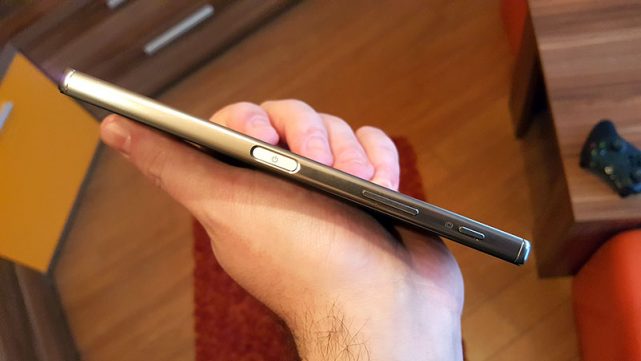
Pros of Side-mounted Fingerprint sensors
- Reach and Accessibility
Truth is: no matter how you hold your phone during operation, you’d have at least one finger on the side of your device. Also, irrespective of how you place your phone on a surface (face up or down), you can easily get to unlock your device before you even pick it up from the surface.
- It’s just as fast
Yeah, side-mounted fingerprint readers are just as fast those embedded on the rear or within home buttons. Also, it doesn’t affect the design of the smartphone in any way.
- Flexibility
With front-facing fingerprint sensors, you’re mostly going to get accustomed to using your thumbs to unlock your device while the other four fingers are more commonly used on rear-facing sensors.
Side-mounted fingerprint sensors, however, allows the natural flexibility of using almost any finger (left or right) without being subconsciously accustomed to any.
Cons of Side-mounted Fingerprint sensors
- Might be less secure
Side-mounted fingerprint sensors almost always have smaller surface area compared to those embedded on the front or rear. This means that the sensor only captures a small portion of the finger during authentication, increasing the chances of false positives.
According to AndroidAuthority , the fear that the partial matches from side-mounted fingerprint sensors could be exploited was confirmed by research from New York University and Michigan State University .
Researchers from New York University and Michigan State University last year confirmed those fears, exploiting the partial match to develop a “master fingerprint” that could unlock up to 65 percent of phones (in certain conditions).
- The Smartphone Case Issue
Depending on the design, as well as thickness, smartphone cases may sometimes hinder your finger from being appropriately captured by the side-mounted fingerprint scanner.
All the fingerprint placement locations come other their upsides and downsides. And to be honest, there’s no one-size-fit-all fingerprint placement position; it all boils down to preferences, lifestyle, manner of smartphone usage etc. I, however, would love me a phone with its fingerprint on the front. You? Where do you love your fingerprint sensor?
Sodiq Olamide is a tech writer based in Nigeria, covering the latest reviews, how-tos, and news on consumer tech trends with a unique African perspective. Whether analyzing emerging technologies or offering practical guides, Sodiq brings a deep understanding of how technology shapes lives across the continent.
Type your email…
Biometric security authentication has made quite the splash in the smartphone arena the last couple of years. Fingerprint and Face ID/Unlock are two such Biometric features taking centre stage. Face ID is the newer of the two and as such commands a premium over its Fingerprint counterpart. Devices sporting Face ID are comparatively more expensive than those with just a Fingerprint sensor.
There is perhaps no other company that has fronted Face ID as much as Apple has. As such, we will refer a lot to Apple when talking about this biometric security authentication technology.
Apple made news when they completely overhauled their security authentication system and in the process got rid of Touch ID (Fingerprint) for Face ID for unlocking your iPhone and making payments. In true Apple fashion, consumers aren’t given the option to choose whether they like a feature or not before it’s given the boot.
Without a doubt, Face ID and Fingerprint ID are very convenient ways to maintain a level of security on your device. Instead of punching in a number or password every time, or an unlock passcode, you simply either touch the fingerprint sensor or look at your screen. But the questions still linger; is Face ID secure? What of Fingerprint?
How Safe is Face ID Versus Fingerprint/ Touch ID
According to Apple, the probability that a random person off the street could look at your iPhone X and unlock it using Face ID is approximately 1 in 1,000,000 (versus 1 in 50,000 for Touch ID). As an additional security protection, Face ID for iPhone allows only five unsuccessful match attempts before a passcode is required.
Things get muddy when it gets to twins and siblings though. The statistical probability is different for people that look alike and among children under the age of 13, because their distinct facial features may not have fully developed. My brother whose facial features are vaguely similar to mine managed to unlock 5 separate devices with my Face ID. We are yet to unlock each other’s Fingerprint ID.
From these observations, if somebody snatched your phone, the odds against them unlocking it are high. That ratio of 1 in 50,000 for Fingerprint/Touch ID is hard enough to beat. When it comes to Face ID, the ratio of 1 in a million becomes statistically impossible unless you have a database of the population stowed away somewhere. And even then, there are some caveats.
Clearly, Apple and a few other high-end smartphone manufacturers have their R&D departments burning that midnight oil for cutting-edge technology that won’t be easily beat. The same doesn’t apply to budget handsets that ship with Face ID and Touch ID. At times these have to cut some corners, thereby releasing these features as curiosities without any serious secure technology behind them. Consequently, we wouldn’t place much faith in these biometric security authentication features in lower-end smartphones just yet.
When using Face Recognition to unlock your device, your phone could be unlocked by someone or something that looks like your image. As Face recognition is less secure than Pattern, Pin, or Password, we recommend using the Iris recognition, Fingerprint recognition, Pattern, Pin, or Password to lock the device. Additionally, if you use your face as a screen lock method, your face cannot be used to unlock the screen when turning on the device. Official Samsung S8/S8+ Disclaimer The statistical probability is different for twins and siblings that look like you and among children under the age of 13, because their distinct facial features may not have fully developed. If you’re concerned about this, we recommend using a passcode to authenticate. Apple , About Face ID advanced technology
Face ID Privacy Concerns
The likes of Huawei, ZTE and OnePlus have at some point in the past been caught secretly transmitting data from their smartphones back to Chinese servers. These backdoors while not always ominous are a clear signal that security breaches are a clear and present danger.
Apple, which has a rather impressive track record where privacy is concerned has some checks and assurances in place. The iPhone’s TrueDepth camera captures a user’s facial data by projecting 30,000 invisible dots to creates a depth map of the face.
This Face ID data is encrypted and protected by the Secure Enclave, which is something akin to a super-secure vault in your device. Any data in the Secure Enclave, which can also include eSIM data and mathematical representation of your face never leaves your device and is not backed up anywhere. Theoretically, that is.
Conversely, security in budget smartphones is meh! They intentionally never really say how they implement the security features behind Face ID. Where is it stored and What’s to say that the data we so trustingly offer isn’t being transmitted back to their servers?
A Secure Enclave is a gold standard when it comes to device security. It’s basically a small portion on your device that is inaccessible mere mortals like you and I. But that’s the sore point. Many OEMs don’t bother adding a Secure Enclave in their SoCs (System on Chips). By design, this security flaw compromises data stored on a device leaving it open to attack.
Face ID/ Fingerprint ID Security Safeguards
To use Face ID as is the case with Touch ID, you must set up a passcode. In a perfect world (and with iPhone), a passcode will be required of you when:
- The device has just been turned on or restarted.
- The device hasn’t been unlocked for more than 48 hours.
- The passcode hasn’t been used to unlock the device in the last six and a half days and Face ID hasn’t unlocked the device in the last 4 hours.
- The device has received a remote lock command.
- After five unsuccessful attempts to match a face.
- After initiating power off/Emergency SOS by pressing and holding either volume button and the side button simultaneously for 2 seconds.
- If your device is lost or stolen, you can prevent Face ID from being used to unlock your device with Find My iPhone Lost Mode (iPhone)
That’s all well and good and we laud Apple’s implementation of biometric authentication. The same standards, it appears don’t apply to cheap smartphones that are capitalising on the popularity of Face ID. We made a few observations with a $200 smartphone along with 3 more slightly before that price tag. These are our observations in the real world about Face ID.
- You can have as many tries as you like
- You don’t have to make eye contact with the phone camera.
- Subsequently, it can be unlocked when you’re asleep/or closing your eyes
- The phone can be switched off without authentication but can’t work without passcode after Restart
- There is no information about the actual technology running Face ID.
- Limited uses for Face ID other than unlocking the phone.
Last word
Biometric authentic technology is not made to replace a password or PIN on a smartphone. It rather complements those security features already in place. For this reason, you are often not able to unlock your device with either Face ID or Fingerprint/Touch ID when the device starts.
Unlike Apple which touts Face ID as the future, Samsung is more pragmatic in their claims. Where’s the joy in having a secure device your family members can unlock with a smile? Defeats the whole purpose of security where Face ID is concerned. Our advice is to take this technology with a grain of salt. The future is here, but not quite.
Sydney Mugerwa is a seasoned consumer tech writer based in Kampala, Uganda, with a passion for reviewing the latest gadgets and smart devices. From smartphones and wearables to smart home products and cameras, Sydney breaks down the complexities of consumer tech, making it easy to understand through detailed reviews and how-to guides. His mission is to simplify tech jargon and help readers make informed decisions in the ever-evolving world of technology.
Type your email…
The Mobile World Congress (MWC) Barcelona , the world’s largest exhibition for the mobile industry, has just concluded. This annual event gathers leading technology brands to unveil groundbreaking mobile, AI, and digital solutions innovations. At MWC 2025, TECNO showcased a range of AI-driven products, reinforcing its commitment to cutting-edge technology.
The key launches included:
- CAMON 40 Series – AI-powered smartphones with One-Tap FlashSnap and advanced mobile imaging features.
- MEGABOOK S14 – The world’s lightest 14-inch OLED laptop, featuring AI-enhanced multitasking and Snapdragon® X Elite.
- MEGABOOK T14 Air & K15S – Lightweight ultrabooks with AI capabilities and extended battery life.
- TECNO AI Glasses Series – Smart eyewear integrating AI imaging, translation, and AR display.
Jan Stryjak, Associate Director at Counterpoint Research, shared, “In the past year, we have observed significant advancements in the field of AI. AI will continue to drive transformative changes in our daily lives. In this critical period for the economic development of emerging markets, TECNO’s AI technologies are unlocking potential for diverse needs.”
“The application of AI technologies is crucial and urgent in emerging markets. We’re committed to bridging the digital gap between emerging and mature markets,” said TECNO CMO, Laury Bai. “TECNO is taking a practical approach to make AI more accessible, ensuring users in emerging markets can access AI and cutting-edge technologies.”
Laury Bai, TECNO CMO
Driven by its commitment, TECNO has forged a robust partnership with MediaTek, establishing a joint AI laboratory dedicated to accelerating advancements in AI. At the event, James Chen, Vice President of Product and Technology Marketing at MediaTek, emphasized, “The synergistic R&D efforts between TECNO and MediaTek are set to democratize AI technology. Our collaboration powers a seamless, interconnected AI experience, bringing users a future of truly connected intelligence.”
James Chen, Vice President, Product and Technology Marketing at MediaTek
CAMON 40 Series Powered by AI One-Tap FlashSnap Revolutionizes Smartphone Snapshot Photography
TECNO’s Global Product Launch Officer, Olivier Mas, officially unveiled TECNO’s next-generation AI-driven products. Attendees at TECNO’s launch event witnessed the highly anticipated debut of TECNO’s new CAMON 40 Series, a device that embodies TECNO’s legacy of excellence in mobile imaging. Featuring One-Tap FlashSnap Mode and TECNO AI, the series sets a new benchmark in smartphone photography, delivering exceptional snapshot capabilities and AI-enhanced user experiences.
Olivier Mas, TECNO Global Product Launch Officer
The CAMON 40 Series exemplifies a commitment to innovation that transcends hardware and software, extending into strategic partnerships that deliver cutting-edge AI solutions to emerging markets. Matt Waldbusser, Managing Director of Global Solutions and Consumer AI at Google Cloud, remarked, “Our collaboration with TECNO on the CAMON 40 Series is a standout example. Leveraging Google Cloud’s capabilities, we’ve introduced groundbreaking features such as Ask Ella, AI Image Generator, AI Writing, and AI Translate. I am particularly impressed by the industry-leading and competitive edge of some of these innovations. For instance, TECNO’s AI supports text translation in 136 languages, voice translation in 44 languages, and photo translation in 51 languages. We are excited to further strengthen our partnership with TECNO, unlocking limitless potential to bring advanced yet practical AI capabilities to emerging markets in a convenient and secure manner.”
Matt Waldbusser, Managing Director of Global Solutions and Consumer AI at Google Cloud
The CAMON 40 Series’ innovative One-Tap FlashSnap leverages AI to enhance imaging capabilities, revolutionizing mobile photography. AI optimizes camera startup and continuous shooting for instant captures, while AI-powered multi-frame processing intelligently reduces noise and enhances details, delivering sharper, more refined images. Additionally, the BestMoment algorithm analyzes motion patterns, automatically selecting the optimal frames for precise, high-quality shots in dynamic scenarios, ensuring users an unparalleled mobile imaging experience.
TECNO CAMON 40 Demonstrates the Cutting-Edge FlashSnap Capability
To delve deeper into the imaging prowess of the CAMON 40 Series, TECNO invited Frédéric Guichard, CEO of DXOMARK, to share the image performance of CAMON 40 Pro. Frédéric highlighted, “The CAMON 40 Pro 5G has demonstrated exceptional imaging and performance capabilities in our rigorous evaluations. We’ve been particularly impressed with photo performance being the best for devices under 600$, and the 1st eligible device to our Smart Choice Label.”
Onsite photo of Frédéric Guichard, CEO of DXOMARK
Beyond its advanced rapid-capture functionality, the integration of TECNO AI further enhances the device’s capabilities. Intelligent imaging, a 360° AI Call Assistant, and productivity tools elevate creativity and efficiency. Powered by MediaTek’s latest chipsets, the series ensures smooth performance, fast processing, and extended battery life. With a sleek, durable, and water-resistant design, it seamlessly blends style with practicality for modern users.
MEGABOOK S14, the World’s Lightest 14-inch OLED Laptop, Inspires Creators and Game Lovers
The MEGABOOK S14 is TECNO’s first OLED laptop and the industry’s lightest 14-inch OLED laptop, featuring a 2.8K OLED display and incredibly weighing only 899g (31.7oz). The laptop is equipped with the outstanding power of the Snapdragon® X Elite compute platform, the flagship chipset for AI PCs from Qualcomm Technologies, and integrates TECNO’s world’s first self-developed edge-side large-scale AI model, to achieve AI-enhanced multitasking.
World’s Lightest 14-inch Laptop MEGABOOK S14
Specifically designed for next-gen AI productivity, TECNO AI enhances the Ella AI Assistant, AI-powered PPT generation, AI-driven image search, smart albums, and offline meeting transcription with multilingual support. The External Graphics Dock, equipped with a powerful NVIDIA graphic card, delivers scalable, high-performance capabilities for design, gaming, and content creation. The laptop’s 2.8K OLED display with a 120Hz refresh rate ensures exceptional visuals, while DTS:X Ultra dual 2W speakers, Wi-Fi 6E, fingerprint login, and PC Manager optimize connectivity and user experience.
TECNO’s strategic partnership with Qualcomm Technologies was a highlight of the TECNO AI Ecosystem Product Launch event, demonstrating a shared vision for the future of AI PCs. Kedar Kondap, SVP & GM of Compute and Gaming at Qualcomm, took the stage to discuss the integration of Qualcomm’s cutting-edge PC chipset into the new MEGABOOK S14 laptop, underscoring TECNO’s commitment to delivering high-performance computing solutions.
Kedar Kondap, SVP & GM of Compute and Gaming at Qualcomm
In addition, TECNO also introduced several standout new products. The featherlight 999g (35.2oz) ultrabook MEGABOOK T14 Air, features high-speed storage and LPDDR5 memory, while the ultra-thin, all-metal MEGABOOK K15S, equipped with a powerful 70Wh battery and supported by a 65W PD GaN charger, offers a smarter and more long-lasting user experience. Both devices are empowered by TECNO AI with advanced AI capabilities such as AI Album and AI Voice Assistant, making them perfect companions for all aspects of life.
The Next Game-Changing Tech Innovation: See the World with the TECNO AI Glasses Series
TECNO’s new AI Glasses Series also took center stage with the introduction of TECNO AI Glasses Pro and TECNO AI Glasses, reimagining eyewear with cutting-edge imaging, intelligent interactions, and a sleek aesthetic. The TECNO AI Glasses feature an aviator design, while the Pro model showcases a browline style, both embodying timeless elegance and modern fashion.
TECNO AI Glasses Redefine the Way People See the Future
Equipped with a 50MP high-definition camera, the series integrates an OV50D sensor, a 100° ultra-wide-angle custom lens, and an AI ISP imaging chip, forming a mobile-grade imaging system. This system lets users capture stunning, high-resolution photos with advanced AI noise reduction and HDR capabilities. With real-time translation supporting over 100 languages, TECNO AI’s Ella empowers accurate translation even for less common languages, as well as voice control, AI-powered object recognition, and intelligent information summaries for ultimate convenience.
Additionally, the AI Glasses Pro features a MicroLED display with 7th-gen resin waveguide technology, offering a 30° field of view, over 1,500 nits of brightness AR display, and a lightweight, ultra-thin design. The AR display allows users to effortlessly enjoy features like translation display, navigation, information prompts, and teleprompting.
Equipped with a 250mAh battery, these glasses offer over 11 hours of music playback and 8 hours of mixed use with just 30 minutes of charging. An advanced ultra-linear speaker, bass enhancement, and spatial sound deliver an immersive audio experience, while Wi-Fi 6 and Bluetooth 5.4 ensure seamless connectivity.
With these innovative launches, TECNO is setting new standards in mobile imaging and AI-enhanced technology, shaping a more connected and empowered future for consumers in emerging markets. Once again, TECNO has showcased its cutting-edge innovation on the global stage at MWC. With the brand essence of “Stop at Nothing”, TECNO’s relentless pursuit of innovation is making AI-powered technology more accessible, allowing consumers to experience the future ahead of time.
Solomon Obwot is a tech writer based in Kampala, Uganda, with extensive experience in the local tech startup ecosystem. He covers the latest news and analysis on consumer tech, writes in-depth smartphone reviews, and conducts insightful interviews with industry experts. Solomon is also a passionate podcaster, sharing his knowledge and engaging in discussions about Africa’s rapidly growing tech landscape. Send emails to [email protected]
Type your email…
